The End of the “Unphishable” Myth? New Attacks Shatter Passkey Protections

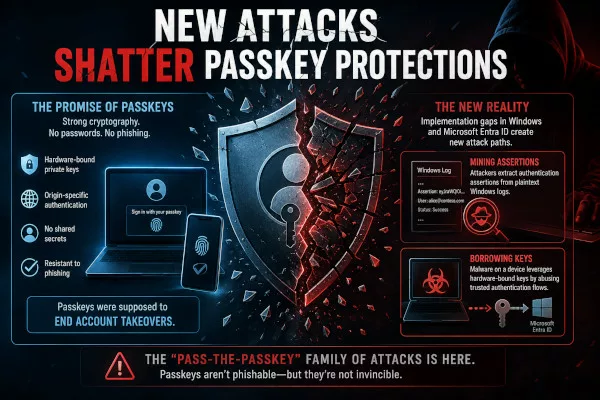
For the past few years, the cybersecurity world has really rallied behind passkeys with one major promise: they’re unphishable. The idea was that by swapping out vulnerable passwords for secure, hardware-bound, origin-specific cryptography, we’d finally put an end to the era of account takeovers.
But as it turns out, there’s a bit of a reality check. In early 2026, groundbreaking research from the teams at SpecterOps and Unit 42, along with independent researcher Dirk-jan Mollema, highlighted a pretty harsh truth. While the underlying math behind passkeys is still incredibly robust, the way they’ve actually been implemented in Windows and Microsoft Entra ID has left some massive gaps.
Unfortunately, those gaps give attackers plenty of room to operate. We’re now seeing a whole new family of “Pass-the-Passkey” attacks where hackers have found clever ways to “mine” security assertions right out of plain-text Windows logs, or even “borrow” hardware-bound keys using malware.
It’s a great reminder that while the core technology itself is fantastic, how we implement it in the real world is just as important!
The Login Windows Kept: Passkey Assertion Mining
The most shocking discovery involves how Windows 11 handled authentication telemetry. Researchers found that prior to July 2026 updates, the Windows WebAuthn API wrote full, valid authentication assertions directly into the plaintext event log.
When a user authenticates with a YubiKey or Windows Hello, an “assertion” is generated—a signed package containing a challenge, authenticator data, and a signature. SpecterOps discovered that Windows logged these in the Microsoft-Windows-WebAuthN/Operational log, which is readable by authenticated unprivileged users.
The Replay Chain: Normally, an assertion shouldn’t be reusable because of “challenge freshness”. However, Microsoft Entra ID (formerly Azure AD) failed to enforce standard replay protections. It did not check for challenge reuse, did not bind challenges to specific user sessions, and did not track signature counters. This allowed an attacker with low-privilege access to a machine to “mine” a user’s previous assertion and replay it to impersonate them, satisfying phishing-resistant MFA requirements without ever touching the victim’s physical hardware key.
This vulnerability is now tracked as CVE-2026-34348.
Borrowing Hardware: Silent Windows Hello Abuse
While the assertion mining attack relied on a logging bug, researcher Dirk-jan Mollema demonstrated an even more persistent threat: hardware borrowing.
Windows Hello for Business (WHfB) is designed for a seamless, single sign-on experience. Because of this, once a user is interactively logged in, the OS uses “ticketing” to keep private-key operations available without constantly re-prompting for a PIN or biometric.
Mollema discovered that malware running in a victim’s active session can call native cryptographic interfaces (like Ncrypt.dll) to load the WHfB key and sign arbitrary authentication data. The malware doesn’t need to steal the key—it simply “borrows” the hardware to sign a WebAuthn assertion for the attacker.
The Pivot to Persistence: By using this “borrowed” signature, an attacker can:
- Sign in to Entra ID as the victim.
- Register a new, attacker-controlled device to the tenant.
- Obtain a Primary Refresh Token (PRT), which acts as a “master credential” for 14-90 days of continuous cloud access.
- Add their own backdoored authentication methods (like a new FIDO2 key) to the account.
The Convenience Trap: Synced Passkey Vulnerabilities
Not all passkeys are created equal. Device-bound passkeys stay in a TPM or YubiKey, but synced passkeys (Google Password Manager, Bitwarden, etc.) copy private keys to a cloud vault for convenience.
Unit 42 research showed that this convenience introduces a significant attack surface. They identified the “Security Domain Secret,” a 32-byte master key Google uses to protect synced passkeys. Researchers found this secret was temporarily exposed in Chrome’s process memory and device logging. If malware extracts this secret, the attacker can recover the private keys for every synced passkey the victim owns. Unlike a stolen session cookie, these private keys are permanent until manually revoked—a process Google currently makes difficult.
Bypassing the Browser: Malware-Initiated Phishing
Passkeys are phish-resistant because the browser enforces the “origin check”—it won’t let evil.com request a passkey for google.com.
However, malware running on Windows can bypass the browser entirely by calling the WIN32 WebAuthn API directly. In this scenario, the malware—not the browser—supplies the “origin”. It can trigger a standard, trustworthy-looking Windows authentication dialog that claims to be from login.microsoft.com.
Combined with “Prompt Flooding” (repeatedly spamming the user with dialogs until they reflexively hit “OK”) and Window Handle Spoofing (making the prompt appear to belong to a legitimate app like Edge), even savvy users can be coerced into signing a malicious request.
Tools of the Trade: The Attacker’s Toolkit
The researchers didn’t just find vulnerabilities; they built the tooling to prove their feasibility.
- SharpPasskeys: A .NET assembly used by C2 agents to display rogue passkey prompts, list Windows Hello credentials, and monitor event logs.
- Passkey Injector: A custom browser built on WebView2 that allows attackers to intercept WebAuthn requests and inject responses captured from other sessions.
- ROADtools: A framework that can use “borrowed” WHfB assertions to register fake devices and obtain PRTs from Entra ID.
- Software Signer: A component capable of loading exported passkey files (from KeePassXC or Bitwarden) and generating valid WebAuthn signatures on any machine.
Why Common Defenses Fall Short
A common misconception is that features like Credential Guard would stop these attacks. While Credential Guard is powerful, it is designed to protect LSASS memory from credential dumping of NTLM hashes and Kerberos tickets.
Credential Guard cannot prevent WebAuthn replays because the vulnerability lies in the Windows Event Logging Service, which it does not protect. The replay attack does not require the private key; it uses the already signed assertion that has already been generated by the legitimate hardware and leaked to the logs.
Similarly, requiring “phishing-resistant MFA” via Conditional Access can be satisfied by these attacks. From the perspective of the cloud service, a replayed assertion or a “borrowed” signature looks identical to a fresh, legitimate login.
Defending the New Perimeter
Identity is now the perimeter, and that perimeter has moved into the hardware itself. To defend against the “Pass-the-Passkey” family of attacks, organizations must adopt a defense-in-depth strategy:
Immediate Technical Controls:
- Patch Immediately: Apply the July 14, 2026, security updates to address CVE-2026-34348 and truncate signature fields in the logs.
- Enable Conditional Access Token Protection: This cryptographically binds Primary Refresh Tokens (PRTs) to the specific device they were issued to, preventing them from being exfiltrated and reused on attacker machines.
- Require MFA for Device Registration: Ensure that users cannot register new devices to the tenant without a fresh, strong MFA check. This breaks the chain needed for attackers to achieve long-term persistence.
Architectural Hardening:
- Mandate Device-Bound Keys for High-Value Accounts: For Global Admins and other privileged roles, prohibit the use of synced passkeys and mandate hardware FIDO2 keys (like YubiKeys) that require physical presence confirmation.
- Enforce Attestation: Configure relying parties to only accept passkeys from verified, genuine hardware authenticators.
- Session-Bound Challenges: Web application developers should bind WebAuthn challenges to the specific user session so that an assertion intercepted in one session cannot be used in another.
Detection and Monitoring:
- Audit WebAuthn Logs: Monitor for Event ID 2106 in the
WebAuthN/Operationallog, specifically looking for WebAuthn API usage by non-browser applications. - Hunt for Anomalies: Set up alerts for unexpected device registrations or new passkey registrations on privileged accounts. Look for sign-ins where the
Device IDclaim is empty, which may indicate the use of a software signer or replayed assertion. - Monitor Service Principal Name (SPN) counts: Minimizing user objects with SPNs and using group Managed Service Accounts (gMSAs) can reduce the attack surface for related lateral movement techniques like Kerberoasting.
So, what we have learned here? Passkeys are absolutely a massive step forward for security, but they aren’t a magic bullet. As this research shows, how the Passkeys be implemented matters just as much as the underlying math. Think about it: a “phishing-resistant” credential is really only as strong as the operating system managing it and the cloud service verifying it.
For our concern of security, it’s time to move past the “unphishable” myth. We need to start treating things like passkey material, browser memory, and authentication logs as highly sensitive, high-value territory.
Ultimately, in a world where an attacker can pivot through a network in just 90 seconds, relying solely on strong cryptography isn’t enough. Our defenses really need to be built on a solid, architectural foundation.