The 11-Year-Old Bug: How CVE-2026-24061 Exposes 800,000 Linux devices Globally

It was just past midnight, and the only sound in my home office was the rhythmic, low-frequency hum of an ancient industrial controller I had pulled from a client’s “forgotten” rack earlier that day. I was alone, huddled over my keyboard in the dim glow of my monitors, nursing a lukewarm coffee and trying to troubleshoot a configuration error on a piece of gear so old its SSH implementation refused to handshake with modern cryptographic standards. Out of pure operational necessity, I did what many of us in the field have done in a pinch: I fell back to a Telnet session, figuring the only real risk in my isolated lab was a bit of cleartext sniffing. But then, a flash on my secondary monitor caught my eye—a critical alert for CVE-2026-24061. As I read about this 11-year-old argument injection flaw that grants instant root access with a simple -f root string, a chill went down my spine that had nothing to do with the office AC. I realized that the very “convenience” I was using was part of a global exposure of nearly 800,000 devices that have been sitting ducks since 2015. I’ve spent my career in these trenches of legacy debt, and I know exactly how unsettling it is to find out a “skeleton key” has been hanging in your lock for a decade; but I’ve spent the last few days verifying the path forward, and I’m here to share a solution you can finally trust.
CVE-2026-24061 is a critical authentication bypass in GNU InetUtils telnetd (v1.9.3–2.7). It allows remote root access via argument injection in the USER variable. With a 9.8 CVSS score, it impacts ~800,000 devices and is subject to active exploitation.
While that summary captures the essential facts, the technical “how” is where the real danger—and the ultimate solution—lies. In the sections below, I’m going to pull back the curtain on the argument injection mechanics that make this exploit so trivial to execute, explaining exactly why a single unsanitized environment variable can hand over the keys to your kingdom. We will explore the phased operational patterns currently observed in the wild—from initial probing to active weaponization—so you can recognize the indicators of compromise before it’s too late. More importantly, I’ve mapped out a comprehensive remediation roadmap that goes beyond a simple patch, covering everything from immediate firewall blocks to a secure migration toward SSH infrastructure. Stick with me until the end; we are going to turn this “absolute gift” for threat actors into a secure, non-event for your organization.
The Anatomy of a Bypass: How One Malicious String Shatters Authentication
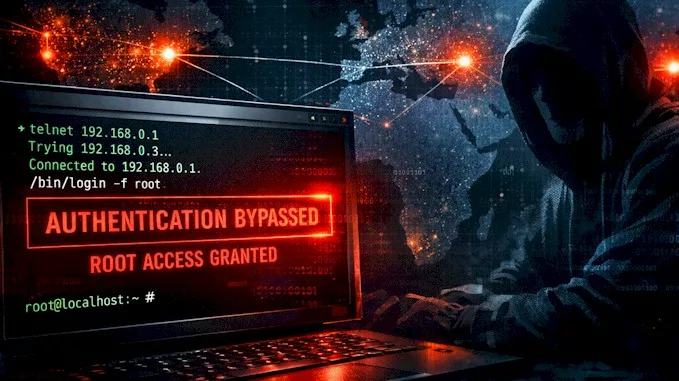
Imagine you’re trying to get into a high-security building, and instead of showing an ID card, you just hand the security guard a sticky note that says, “The boss said I’m allowed to walk right in without checking my bag.” In the digital world, that is exactly what CVE-2026-24061 does to a piece of software called GNU telnetd, a service that has been helping people log into computers remotely since the early days of the internet. This “skeleton key” isn’t a complex piece of code; it’s a simple, short string of text: -f root. When an attacker sends this specific string as their “username,” the system gets confused and hands over a root shell—essentially giving the intruder total, unrestricted “god-mode” control over the entire machine—without ever asking for a password.
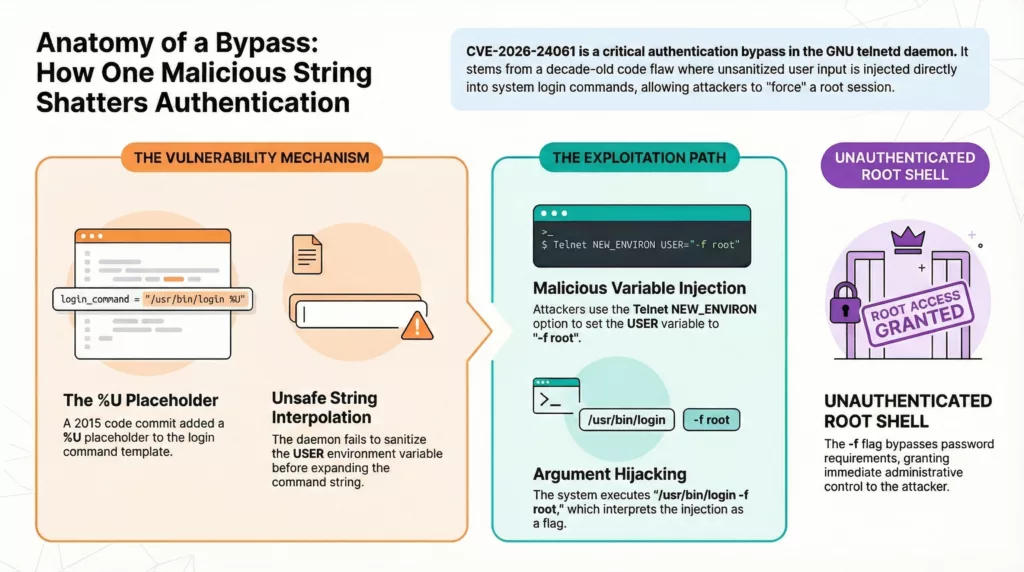
To understand why this happens, we have to look back at a mistake made nearly 11 years ago. On March 19, 2015, a small change was made to the software’s code to help it handle usernames more flexibly. The programmers added a placeholder (called %U) that would take whatever name a user typed in and pass it along to the system’s actual “login” program. As developer Simon Josefsson later explained to the security community, the flaw exists because the server doesn’t “sanitize” or clean up what the user sends before passing it along. It’s like a secretary who dutifully types exactly what a visitor says into a formal memo without realizing they’re typing a command to fire the CEO.
This is a classic case of what we call “Argument Injection.” In the Linux world, many programs use little flags (like -f) to trigger special behaviors. The -f flag is a powerful one; it literally stands for “force” and tells the login program to skip the password check for a specific user. Normally, this is only used by the computer itself for internal, trusted tasks. But because of this bug, an attacker can trick the Telnet service into running a command that looks like this: /usr/bin/login -f root. The computer sees that -f and thinks, “Oh, I guess I already checked their ID,” and opens the door wide.
You might wonder why anyone is still using Telnet in 2026 when it’s so old and famously insecure. The truth is, it’s often a “nuance of necessity.” Many of my fellow architects still find Telnet lurking in industrial sensors, hospital equipment, and old network switches that are simply too ancient to handle modern, encrypted connections like SSH. In fact, recent internet scans found nearly 800,000 devices still listening for Telnet connections globally, with massive clusters in countries like China, Brazil, and the United States. For a threat actor, this vulnerability is a “zero-effort” gift that requires no special tools—just a single line of text and a few seconds of time to gain complete control.
A Legacy of Risk: Why 800,000 Devices Are Still Sitting Ducks
You might be wondering, “If this thing is so broken, why on earth is it still out there?”. It’s a fair question, especially since most of the tech world moved to secure connections years ago. The reality is that there are still over 800,000 servers globally that leave the Telnet door wide open. In fact, some internet scans suggest as many as one million devices are listening on the default Telnet port right now, just waiting for a connection. These aren’t just old desktop computers; they are the invisible gears of our modern world.
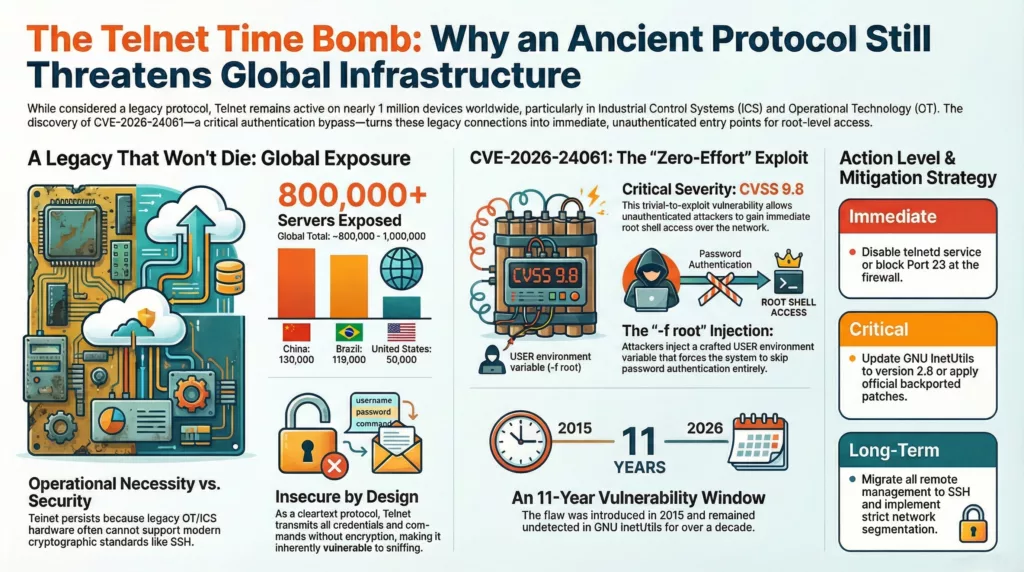
Where are these “Sitting Ducks” hiding?
• Industrial Controls (OT): The specialized controllers running factory lines and power plants.
• IoT & Home Gear: Smart sensors, routers, and “shadow” devices often found in homes or small offices.
• Legacy Infrastructure: Ancient network switches and hospital equipment that have been humming along for decades.
• Development Systems: Old staging or backup servers that were never properly locked down for the real world.
The reason we can’t just flip a switch and turn it all off is what we call “legacy debt”. Some of these devices are so old they simply lack the “brain power” to handle the complex mathematical scrambling required for modern security like SSH. I’ve seen specialized equipment in logistics and maritime industries that are functionally perfect but technically trapped in the early 2000s. As security expert Ian Thornton-Trump put it, this vulnerability is an “absolute gift for nation-state threat actors” looking to hide inside these critical systems.
| Feature | Telnet (The Legacy Way) | SSH (The Modern Way) |
|---|---|---|
| Privacy | None. Sent in plain text. | High. Scrambled for safety. |
| Passwords | Easy for hackers to “sniff”. | Highly protected with encryption. |
| Safety | High-trust (Assumes everyone is a friend). | Zero-trust (Requires digital keys). |
| Risk Level | Critical. Vulnerable to “Zero-Effort” hacks. | Secure. The industry standard. |
When we look at the map, the problem is truly global, affecting systems in almost every corner of the world. The largest clusters of these exposed devices are found in China (130,000) and Brazil (119,000), followed closely by the United States (50,000) and Japan (41,000). These numbers represent real organizations—from manufacturing plants to telecommunications providers—that are currently exposed to a “zero-effort” attack because of this 11-year-old oversight.
The most chilling part is that many of these are “shadow” devices—gear that a company might not even realize is plugged into their network or that came with Telnet enabled by default for “easy troubleshooting”. Because Telnet sends everything in cleartext, any hacker who gets a “look” at the traffic can see usernames and passwords as clearly as if they were reading them over your shoulder. It’s a dangerous conflict between keeping old machines running for convenience and the urgent need to protect our digital lives.
Observed in the Wild: Tracking the Coordinated Waves of Exploitation
It’s one thing to talk about a “theoretical” bug, but it’s another thing entirely when the bad guys start using it to break into real systems. Just days after this flaw was revealed, it wasn’t just researchers looking at it—it was everyone from opportunistic “script kiddies” to professional hacker groups. The U.S. Cybersecurity and Infrastructure Security Agency (CISA) was so concerned that they officially added CVE-2026-24061 to their “Known Exploited Vulnerabilities” catalog, basically sounding a global alarm that this is being used for real attacks right now. In fact, one security firm reported that a “honeypot”—a computer specifically set up as a trap to watch hackers—was compromised in less than 60 minutes after being turned on.
To help you visualize what this looks like, researchers at GreyNoise and TXOne have been tracking exactly how these attacks happen. It isn’t just a random mess; it’s a phased operational pattern that looks like a coordinated heist. At first, the hackers just “knock on the door” to see if it’s open, then they do a quick “room check” to see what’s inside, and finally, they “move in” and change the locks so they can come back whenever they want.
| Exploitation Wave | Action Taken | Primary Purpose |
|---|---|---|
| Wave 1: The Probe | Sending a minimal -f root string. | Validation: Seeing if the target is actually vulnerable. |
| Wave 2: Verification | Running quick commands like id or uname -a. | Reconnaissance: Confirming they have “root” (god-mode) access. |
| Wave 3: Weaponization | Using curl or wget to download malicious scripts. | Persistence: Installing backdoors and botnets for long-term control. |
The most common “move-in” tactic researchers found was the use of Downloader Stagers. Since these hackers are often attacking very old or simple devices like industrial sensors or routers, they have to be clever. They write scripts that try three or four different ways to download their malware—using every tool available on the machine—to make sure they get their “big guns” installed. Once they are in, they often drop an SSH key into the system’s settings. This is the ultimate “changing the locks” move; it lets them log in securely later without even needing to use the Telnet bug again.
“This is a ‘zero-effort’ exploit that grants immediate root access, making it highly attractive for botnet operators and state-sponsored actors.” — Global Technology Industry Association.
Geographically, these attacks are coming from everywhere—Hong Kong, the U.S., Japan, Germany, and more—targeting everything from web servers to maritime and logistics infrastructure. As security expert Ian Thornton-Trump put it, this vulnerability is an “absolute gift for nation-state threat actors” who want to hide inside critical systems like power grids or factory lines. They aren’t just looking to break things; they want to stay hidden so they can snoop on data or launch a much bigger attack later.
It’s a sobering reality, but knowing the “playbook” they use is the first step toward stopping them. By understanding that these attacks move from a simple probe to a full-blown takeover, we can better appreciate why the solutions I’m about to share aren’t just “suggestions”—they are essential armor for your digital life. Stick with me, because next, we’re going to walk through how to spot if someone has already tried to “knock on your door” and exactly how to bolt it shut for good.
Assessing Your Exposure: Forensic Indicators and Detection Strategies
So, here’s the million-dollar question: “How do I know if I’m already a victim?” If you’ve got a server running, it’s natural to feel a bit of “security anxiety” right now. Think of this section as your digital home inspection kit. We are going to look for the “fingerprints” a hacker leaves behind when they use this specific -f root trick. The first thing you need to do—and I can’t stress this enough—is check the version of the software you’re running. If you see GNU InetUtils versions 1.9.3 through 2.7, your “front door” is effectively unlocked, and you need to act immediately.
To get started, you don’t need to be a coding wizard. You can run a few simple commands to see if the Telnet service is even “listening” for a knock on the door. As we’ve discussed, if you see anything active on Port 23, that’s a red flag. Here is a quick “cheat sheet” of what to look for when you’re checking your own systems:
| Detection Step | What to Type (The Command) | What a “Safe” Result Looks Like |
|---|---|---|
| Check Version | telnetd --version | Version 2.8 or higher. |
| Check Port 23 | sudo ss -tuln | grep :23 | No output at all (it means the door is closed). |
| Check Status | systemctl status inetutils-telnetd | “Inactive” or “Disabled”. |
If you find that you are running a vulnerable version, it’s time to play detective and look for Forensic Indicators—the digital equivalent of muddy footprints on the carpet. One of the biggest “tells” for this specific hack is seeing a root login in your logs that has no matching “password success” message. It’s like seeing someone inside your house when the security camera never showed them walking through the door. You should also look for any process named login that was started with that suspicious -f flag. In a normal, healthy system, that almost never happens.
What the “muddy footprints” look like in your logs:
• Log Inconsistencies: Root sessions starting in /var/log/auth.log with zero authentication logs before them.
• Suspicious Commands: Seeing “reconnaissance” commands like whoami, id, or uname -a popping up out of nowhere.
• Stowaway Files: Check your temporary folders (like /tmp or /dev/shm) for weird scripts or files you didn’t put there—hackers love hiding their tools in these “junk drawers”.
• Unexpected “Lock Changes”: Look for new SSH keys added to the authorized_keys file for the root user; this is how they “change the locks” to stay in even after you fix the Telnet bug.
I have to give you a bit of a “calm but serious” warning here: “Absence of alerts should not be treated as confirmation that systems are uncompromised”. Because this attack uses the computer’s own “trusted” login tools, it can be incredibly quiet. If your server has been sitting on the public internet with Telnet open, the safest mindset is to assume a breach until you have thoroughly investigated and patched it. It sounds scary, but catching it now is a thousand times better than finding out months later that a stranger has had the keys to your kingdom the whole time. Stick with me for the final part, where I’ll show you exactly how to bolt that door shut for good.
The Secure Path Forward: From Emergency Mitigations to Hardened SSH
If you’ve discovered that your system is one of the thousands currently vulnerable, take a deep breath—we’re moving from the “scary news” phase into the “fixing it” phase. Think of this as bolting the doors and installing a state-of-the-art alarm system. The very first thing you must do is “stop the bleeding” by either updating your software or shutting off the Telnet service entirely. If you can, upgrade to GNU InetUtils version 2.8 or later, which finally includes the “sanitizer” code that scrubs away malicious strings like -f root. If an update isn’t immediately available for your specific machine, don’t wait; you should disable the Telnet service right now to make sure no one can use that “skeleton key” to get in.
Your Emergency “To-Do” List:
• Update Immediately: Get to version 2.8+ to fix the code flaw.
• Kill the Service: Use commands like systemctl stop and disable to keep Telnet from running.
• Block the “Front Door”: Set your firewall to explicitly block Port 23, which is the specific frequency Telnet uses to talk to the world.
• Isolate the Patient: If you absolutely must use Telnet for an old piece of hospital or factory gear, hide it behind a VPN or a “management network” so it’s not visible to the open internet.
Once the immediate threat is neutralized, it’s time to move toward a permanent, professional solution: SSH (Secure Shell). If Telnet is like sending a postcard where anyone at the post office can read your secrets, SSH is like using an armored, GPS-tracked safe. Installing it is usually a simple one-line command (like sudo apt install openssh-server), but the real magic happens in how we “harden” it to make it a fortress. We want to move away from easy-to-guess passwords and toward “Key-Based Authentication,” where you have a digital “physical key” on your laptop that is the only way to unlock the server.
| Hardening Step | What It Does (The “Friend” Explanation) | Why It Matters |
|---|---|---|
| Disable Root Login | Tells the “King” (root) he can’t walk in the front door; he has to use a side door first. | Prevents hackers from taking total control instantly. |
| Use SSH Keys | Replaces passwords with a complex digital key that only lives on your computer. | Makes “password guessing” attacks impossible. |
| Change Default Port | Moves your “front door” from the standard spot to a secret location (like Port 2222). | Hides you from 99% of automated hacker “bots.” |
| Deploy Fail2ban | A digital “bouncer” who kicks anyone out if they fail to log in 3 or 5 times. | Automatically blocks suspicious people in real-time. |
To make your new SSH setup truly secure, you should also consider changing your default port. Hackers usually scan the “standard” ports (like 22 for SSH or 23 for Telnet) looking for victims; moving your connection to a non-standard number is like taking the house number off your home so random solicitors can’t find you. Furthermore, by setting up a tool called Fail2ban, your server will watch for anyone trying to guess a password and automatically block their “phone number” (IP address) for a few hours. It’s an active defense that works while you sleep, ensuring that your transition away from the “legacy debt” of Telnet is a permanent upgrade to your peace of mind.
“Hardening a Linux server isn’t about checking a box… it’s about building a resilient security mindset… Secure everything by default. Open only what’s absolutely necessary.” — Security Best Practices Guide.
By following this roadmap, you aren’t just patching a bug; you’re transforming your system from a “sitting duck” into a resilient stronghold. Remember, security is a journey, not a destination. Regularly checking your logs for “muddy footprints” and keeping your software updated will ensure that the next “11-year-old bug” doesn’t have a chance to knock on your door. You’ve taken the most important step by educating yourself today—now go bolt those digital doors!